Mon - Fri: 09:00 - 18:00 EST 1000 Telegraph St #600, Reno, NV 89502, US
Workflow Blueprint

Post Sessions - Dialogue Effects Music

Architectural grouping and visual isolation for dialogue editing, sound effects stems, and musical cue tracks in long-form delivery sessions.

Post-Production Routing Principles

Film and television reels demand uncompromising separation across narrative elements. When engineering high-density mixes, the ability to organize large session tracks systematically prevents cognitive fatigue. Leveraging Pro Tools folder tracks alongside an intentional track pin routine maintains clarity across complex arrangements.

01 Strict Stem Segregation

Partition DX, FX, and MX stems into dedicated routing containers to eliminate accidental bus cross-talk.

02 Persistent Pinned Reference

Fix the guide track and dialogue master at the top of the edit window during detail editing.

03 Selective Folder Folding

Collapse background Foley and complex music edits while editing production dialogue lines.

Isolating Three Sound Worlds in One Timeline

A standard episodic or feature post-production reel brings together wildly divergent material: noisy location lavaliers, massive layered creature effects, and multi-mic orchestral scores.
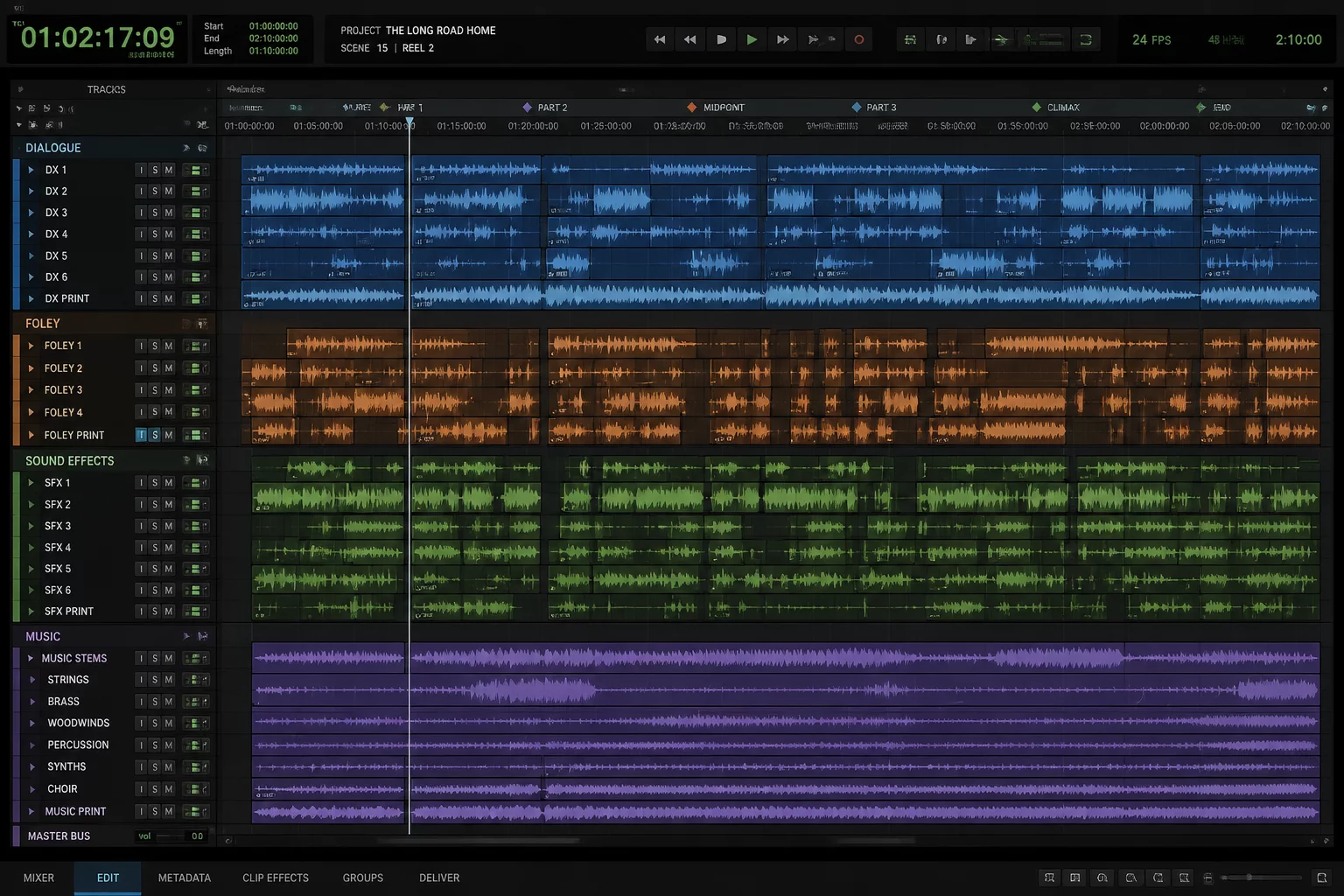
Complex post-production session organized into dialogue, sound effects, and music stems

Handling disparate dynamic ranges and processing chains requires separating DX, FX, and MX early in the editorial pass. Efficient engineers establish dedicated routing paths early. When you utilize Pro Tools folder tracks for multi-track sub-mixes, you gain both compact track views and direct bus control without sprawling across dozens of faders.

Establishing visual hierarchy prevents misplacing crucial production room tone or sound effect sync cues when switching between detailed spectral repair and scene-level re-recording. Furthermore, applying a disciplined track pin scheme on essential master faders, stems, and mix references guarantees your baseline levels remain consistently in sight as you navigate through deep arrangement timelines.

Core Timeline Layout Metrics

Tested structural metrics for stabilizing multi-track reel sessions across delivery phases.

  1. 1
    Primary Stem Division: 3 master routing submasters (DX, FX, MX) feeding isolated re-recording print tracks
  2. 2
    Pinned Anchor Tracks: Top 3 slots reserved for Picture Video, Sync Audio Reference, and Primary Dialogue Master
  3. 3
    Typical Track Density: 80 to 240 active audio lanes organized inside nested routing and basic folders
  4. 4
    Edit Window Height Ratio: Active target lane set to Medium or Jumbo height with dormant stems fully collapsed

Managing Cognitive Load During Re-recording Mixes

When working with massive stem counts, keeping every lane expanded clutters navigation and slows decision-making. Learning how to organize large session sessions requires treating the workspace like an architectural schematic. Color coding, folder collapse states, and localized routing combine to maintain peak performance during demanding production phases.

Maintaining Visual Grounding with Anchors

Keeping reference guide tracks visible while scrolling ensures ADR, Foley, and fader balancing match the director's cut without constant vertical panning. With consistent template rules applied, you can shift from raw tracking into deep surgical editing or final printing without rebuilding your view configuration each time.

Need Help Structuring Complex Post-Production Sessions?

Consult with our workflow specialists to build tailored post-production templates, routing matrices, and timeline views for your studio.

Request Workflow Consultation
Direct Consultation

Book Session Workflow Consulting

Request personalized studio timeline structuring and routing guidance tailored to your DAW arrangement.

Community Insights

Engineer Discussion

0 Comments

No comments yet. Be the first to leave a comment.

Leave a Response