Navigating Multi-Mic Track Density
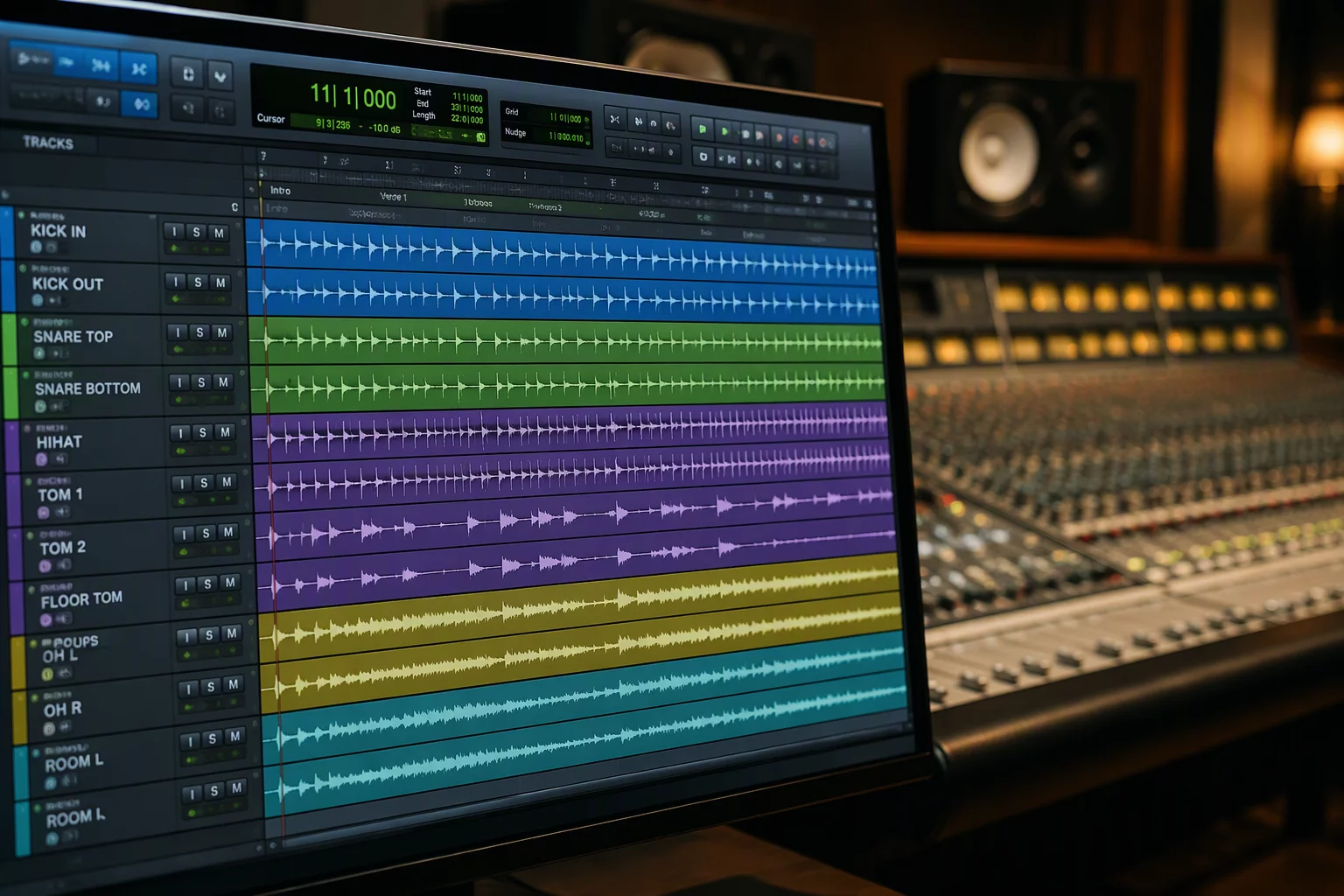
Tracking complete acoustic drum kits across modern genres demands numerous specialized transducers. A typical tracking list includes inside and outside kick microphones, sub-kick transducers, top and bottom snare pairs, dedicated hi-hat spot mics, multiple close toms, under-cymbal spots, and three separate stereo room ambiences. When thirty individual waveforms spread across the screen, scrolling vertically to verify a single tom transient fractures concentration and slows tracking pace.
To prevent visual exhaustion, engineers adopt Pro Tools folder tracks as structured containers. Dividing raw microphones into logical groups such as shells, cymbals, and rooms makes it effortless to organize large session timelines while preserving individual gain trims, hardware insert assignments, and automation lanes.
Transient Alignment and Phase Protection
A major danger when handling dense multi-track recordings is phase cancellation resulting from accidental non-grouped edits. Slicing one microphone clip without moving its corresponding bleed sources instantly weakens low-end definition and hollows out snare crack. Maintaining a global drum edit group guarantees that slip edits, crossfades, and timing nudges process every transducer in lockstep.
Visual reference plays an equally critical role during granular editing. Locking the stereo overhead channel at the top of the workspace using track pin provides an unmoving temporal ruler. As the operator scrolls through deep floor tom or room channels beneath, the primary timing reference stays directly in view for instant phase checks.
The Pinned Overheads Principle
Always designate your main stereo overhead pair as the visual anchor. By keeping this capture steady at the top of your workspace, transient peaks from close mics remain easy to evaluate against room distance delays without constant vertical searching.
Folder Hierarchy for Tracking and Mixing
Tracking stages demand expanded track visibility so input levels, clip lights, and pre-amp overloads remain obvious to the recording engineer. However, once the take receives approval and session attention transitions to bass overdubs or rhythm guitar tracking, keeping thirty raw drum lanes visible creates needless friction.
Nested routing containers solve this operational transition. Collapsing individual close and room channels leaves only three top-level stems on display: Drums Shells, Cymbals, and Room Ambience. The whole rhythm section condenses into manageable strips while maintaining complete sub-mix processing.
- Master Drum Routing Folder acts as central summing node, bus compressor host, and global solo anchor.
- Nested Shells Folder encapsulates all kick, snare, and tom microphones into a single collapsible section.
- Pinned Stereo Overheads retain continuous timeline visibility regardless of scroll position.
- Dedicated Drum VCA channel delivers smooth relative balancing without disrupting analog plugin input calibration.
Key Facts & Technical Specifications
- Input Configuration
- 28 discrete analog microphone lines routed to dedicated DAW audio tracks
- Folder Architecture
- Two-tier nesting: Master Drum Bus containing Shells, Cymbals, and Rooms
- Phase Alignment Anchor
- Stereo spaced-pair overhead track pinned to top horizontal boundary
- Edit Group Linking
- All-drum transient group active for sample-accurate multitrack edits
Schedule a Session Workflow Review
Discuss timeline mapping, folder hierarchy, and track pinning tailored to your production studio.
No comments yet. Be the first to leave a comment.